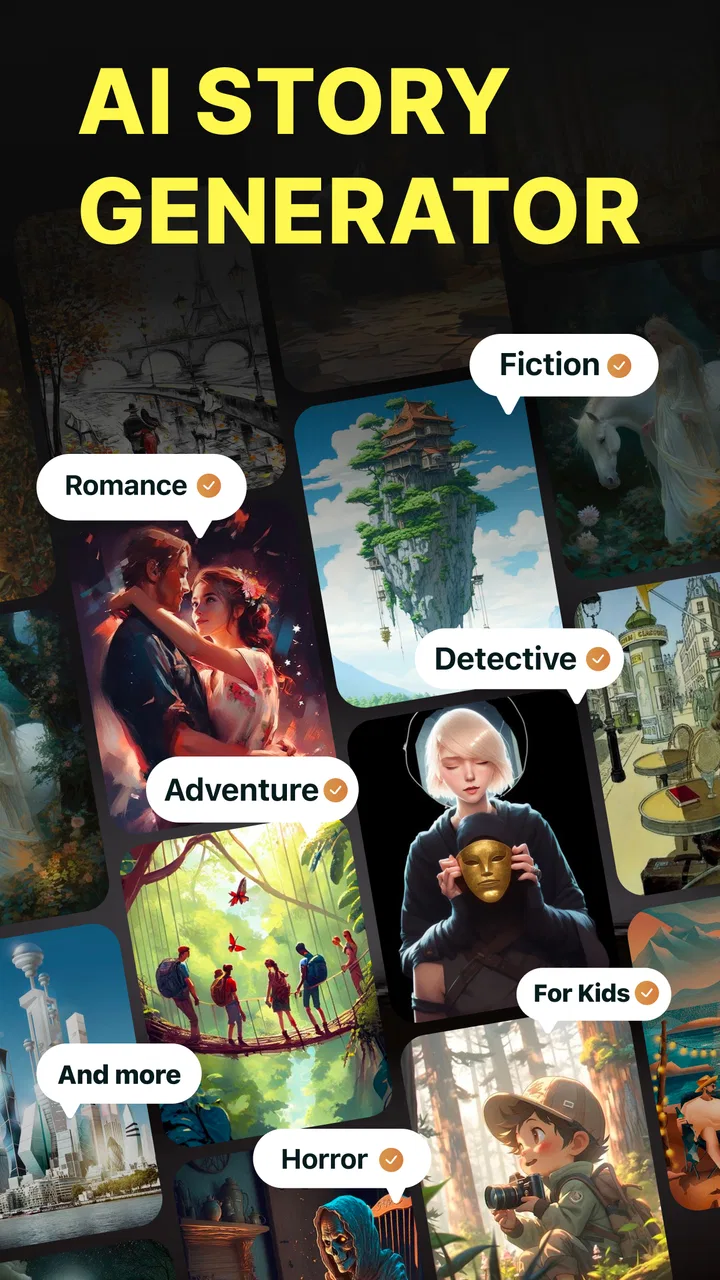
AI Story Generator Novel Maker
- 4.4
- Rating
- 1.00M
- Installs
- Free
- Price

 Analysis by App-foxy
I approached AI Story Generator Novel Maker as a practical writing companion rather than a replacement for a novelist. Developed by Identifier Studio, this free Books & Reference app is built around generating story ideas, plots, novels, and short fiction with help from artificial intelligence. After spending time with it, I found its biggest value in turning a vague starting point into something I could actually work on. It is especially useful when I know the mood or genre I want but cannot find a convincing first scene.
The app is available to an Everyone audience and supports devices running Android 11 or later. Its current version is 12.3, and its popularity is easy to understand: it has passed one million installs, with a 4.4 average from roughly eighteen thousand ratings and about one thousand two hundred written reviews. Those figures suggest a broad audience, but they do not mean every writer will enjoy the same workflow. The experience depends heavily on how much direction you give the generator and how willing you are to edit what comes back.
How I use it from a blank idea to a workable draft
When I begin with only a mood, setting, or stray image, I use the app to find a small decision that can move the story forward rather than asking it to fill a whole page. I then keep a brief note of the choices I want to preserve before trying another direction. That makes the next stage less about collecting more ideas and more about deciding which one deserves a draft.
You May Also Like

 Blood Strike: 2.5 Anniversary
Blood Strike’s Loadouts Turn Every Drop Into a Tactical Gamble
A close look at Blood Strike’s custom loadouts: how fast access to signature weapons reshapes its battle royale rhythm, rewards preparation, and narrows the gap between fights.

 Pandora - Music & Podcasts
Pandora’s Music Is Easy to Start, but Harder to Recover
Pandora’s strength is its low-effort path from a seed to a station. Its weak spot is how much confidence it asks you to place in connection, setup, and quiet recovery.

 8 Ball Pool
 Is Built on Rivalries, Rematches, and Routine
A close look at the rivalries, rematches, shared routines, and unanswered safety questions that turn a quick pool match into a persistent mobile community.

 Samsung Music
’s Quiet Strength Is Playing What You Already Own
Its reach comes less from spectacle than from dependable access to a personal library. That simplicity is both the app’s strongest retention engine and its ceiling.

 AccuWeather: Weather Radar
AccuWeather Review: A Quick, Clear Forecast for Everyday Decisions
For everyday plans, the best forecast is the one you can understand quickly. AccuWeather makes rain timing, radar, and local conditions easy to act on, with a few trade-offs.

 Hill Climb Racing
Why Hill Climb Racing Still Turns Crashes Into One More Run
A tiny car, a bumpy hill and one more upgrade: Hill Climb Racing keeps resurfacing because its simple chaos makes every near-miss feel personal.
More From Our News Desk



Starting with a focused prompt
My most reliable method is not to ask for an entire masterpiece immediately. I begin with a compact premise that includes the situation, the emotional tension, and the kind of story I want to read. A request such as “write a mystery” is too open-ended. A better starting point describes a missing object, a restricted location, the relationship between two characters, and the tone I want. The more useful question is not “Can it write a story?” but “What part of my story do I need help shaping right now?”
For a short story, I use the generator to explore a premise and then select the strongest direction. For a longer project, I treat the first result as a planning draft. I look for the central conflict, the likely turning point, and any character motivation that feels strong enough to keep. I do not assume that the generated text is ready for publication. Its role is closer to a fast brainstorming partner that gives me material to question, cut, rearrange, and rewrite.
This distinction matters because the app can produce fluent passages that still feel familiar. Characters may explain their feelings too directly, scenes can resolve too conveniently, and a dramatic idea may be introduced without enough cause and effect. I get better results when I use the output as raw material instead of accepting every sentence. The app saves me from staring at a blank page, but it does not remove the need for taste, structure, or revision.
Turning one result into several useful options
One practical habit is to generate alternatives at the idea stage rather than repeatedly polishing the first version. If the initial plot has a weak villain or an obvious ending, I ask for a different source of conflict or a less predictable consequence. I then compare the options myself. This is more productive than asking for endless variations of the same paragraph because it keeps my attention on story decisions rather than surface wording.
I also separate planning from prose. First I use the app for a premise, outline, or sequence of events. Only after the structure feels promising do I request scenes. This reduces a common problem with AI writing tools: a polished opening can distract from a story that has nowhere interesting to go. With this app, the strongest workflow is usually iterative. Idea first, structure second, scene third, personal rewrite last.
A realistic everyday use case
Imagine that I have thirty minutes after work and want to write, but I only have a setting in mind: an old apartment building where residents receive letters addressed to people who never lived there. I can use the app to create several possible explanations, choose one that fits the atmosphere, and ask for a short sequence of escalating discoveries. Before writing the final scene myself, I can use the generated material to identify what the protagonist wants and what they risk losing.
That workflow is more realistic than expecting a complete novel during a short break. It gives me a concrete next step. I might leave the session with a character goal, three plot beats, and a scene prompt that I can continue in my own voice. For students, hobby writers, role-playing groups, and people practicing a new genre, that kind of momentum is often more valuable than a long block of generic prose.
Where it fits beside ordinary writing tools
Compared with a notebook, the app is faster at producing alternatives and unexpected combinations. A notebook is better for private reflection, personal memory, and ideas that need no automated interpretation. Compared with a conventional word processor, this app is more useful at the beginning of a project, when the problem is uncertainty rather than typing. A word processor remains the better place for sustained editing, formatting, research notes, and maintaining a carefully controlled manuscript.
It also differs from a traditional plot generator because the output can move beyond a single premise into narrative material. That flexibility is helpful, but it introduces a trade-off: the more open the request, the more likely the result is to wander or rely on familiar patterns. I prefer using it as a companion to my normal writing setup, not as the only place where a complete project lives.
Settings and choices I check before generating
The first setting worth checking is the scope of the request. A short story, a plot outline, and a novel concept require different expectations. If I ask for too much at once, the result may rush through important events. If I ask for a smaller unit, such as a character conflict or a scene objective, I can inspect the result more carefully and guide the next step.
I also pay attention to tone and audience whenever the available controls or prompt choices allow me to express them. “Dark” can mean suspenseful, tragic, frightening, or simply serious. I get more consistent writing when I describe the intended feeling with a concrete situation instead of relying on one broad label. The same applies to genre. A romance with a mystery subplot needs different priorities from a mystery with a small romantic thread, so I state which element should lead.
Another useful check is how much creative control I want to retain. If I already know the protagonist and ending, I give the app those boundaries and ask it to help with connective scenes. If I am genuinely exploring, I leave more room for suggestions. This simple distinction prevents the generator from replacing decisions I have already made. It also makes it easier to recognize when an output is helpful because it solves a problem, rather than merely sounding polished.
Because the app is free to install, it is easy to try without committing money at the beginning. However, in-app purchases range from $4.99 to $29.99 per item. I would therefore spend time testing the basic workflow before paying for anything. The important question is not whether a paid option exists, but whether it improves the part of my process I actually use. Someone who only wants occasional prompts may have a very different view of the value than someone working on a long fiction project.
Shortcuts that make sessions less repetitive
My favorite speed improvement is keeping a small personal prompt template outside the app. I fill in the genre, protagonist, immediate goal, obstacle, setting, tone, and one detail I want to avoid. This takes less time than rebuilding the same context from memory, and it makes comparisons between outputs fairer. The template is not a magic formula; it simply helps me give the generator enough direction to produce material I can evaluate.
I also work in passes. In the first pass, I ask for possibilities. In the second, I select one and request a tighter sequence of events. In the third, I focus on a single scene. This avoids mixing brainstorming, outlining, and line editing in one request. It also helps me notice whether a weak result comes from the premise itself or from asking for too much detail too soon.
A further shortcut is to record decisions after each useful result. I note the chosen motivation, the main obstacle, and the unanswered question before moving on. Without that habit, it is easy to generate attractive alternatives until the project loses its identity. The app can produce plenty of directions, but I still need to act as the editor who decides which direction is the story.
For character work, I find it more useful to ask for conflicting motives than for a long biography. A character who wants safety but needs recognition gives me something to dramatize. A list of favorite foods and childhood memories may add color, but it does not automatically create scenes. This is one of the less obvious ways to get more value from the tool: request pressure, choices, and consequences instead of decorative information.
Limits I noticed when aiming for longer fiction
The app is most comfortable when I give it a contained task. Longer projects expose the difficulty of maintaining continuity. Names, motivations, timelines, and emotional changes can drift if I rely on fresh generations without keeping my own reference notes. I would not use the app as the sole memory of a novel. I keep a separate outline and character sheet, then bring only the relevant details into each new request.
Continuity is not the only limitation. AI-generated prose often arrives at the most obvious interpretation first. If I want an unusual voice, a culturally specific perspective, or a carefully controlled rhythm, I have to supply more guidance and rewrite more aggressively. The tool can suggest a direction, but distinctive style usually comes from the writer's choices after the generation.
There is also a difference between expansion and improvement. Asking the app to make a scene longer may add description without increasing tension. I get better results when I identify the missing function: the protagonist needs to make a decision, the relationship needs a reversal, or the clue needs to change the reader's understanding. Specific revision goals produce more useful assistance than simply requesting “more detail.”
Writers who need strict source handling, extensive citation, or a highly controlled manuscript environment may prefer a conventional writing application with dedicated research and editing tools. This app belongs earlier in the creative process. It is also not ideal for someone who wants a finished novel with no manual revision. The free entry point makes experimentation accessible, but the need for judgment remains the central trade-off.
Who will get the most from it
I would recommend AI Story Generator Novel Maker to beginners who need help moving from an idea to a first draft, experienced writers who want quick alternatives, and readers who enjoy experimenting with fictional premises. It can be especially useful for overcoming a stalled opening, testing whether a concept has enough conflict, or creating several possible routes before committing to one.
Teachers and writing-group leaders may also find it useful for exercises, provided the generated text is treated as discussion material rather than unquestioned model work. A group could compare different approaches to the same premise, identify clichés, and rewrite one scene with a stronger point of view. That turns the app into a tool for learning narrative choices, not just a shortcut for producing pages.
I would suggest skipping it if your main goal is distraction-free long-form editing, private journaling, or a fully manual writing experience. In those cases, the presence of generated suggestions may interrupt rather than help. I would also be cautious if you dislike revising machine-produced prose. The app rewards users who enjoy selecting, correcting, and reshaping ideas; it is less satisfying for anyone expecting the first output to sound personal.
My verdict after building a repeatable workflow
My final impression is positive, with realistic expectations. Identifier Studio has made a useful creative aid for the difficult early stages of fiction. The strongest results come from treating it as an idea laboratory: define the problem, request a manageable piece, compare alternatives, and keep only what serves the story. That approach is more effective than handing over an entire project and hoping the generated text will carry it.
The app's free price makes it approachable, while the Everyone rating and Android 11 minimum requirement make its basic audience easy to understand. Its 12.3 release shows that it is an actively presented product, and the available in-app purchases mean frequent users should evaluate their own workflow before spending. I would start with small prompts, maintain separate notes for continuity, and judge each result by whether it gives me a better decision to make.
The real strength is not automatic authorship; it is fast, repeatable momentum. When I am stuck, the app can give me a premise to challenge, a plot turn to improve, or a scene to rebuild in my own voice. When I already have a clear manuscript and need precise editing, another kind of writing tool is likely a better fit. For writers who understand that difference, this app is a practical addition to a creative routine rather than a promise of effortless novels.
In short, I see AI Story Generator Novel Maker as a flexible starting point for AI-assisted fiction writing. I would recommend trying it for focused brainstorming and structured drafting, then moving the best ideas into a normal editing workflow. Used that way, it can turn a few spare minutes and an unfinished thought into a story direction worth pursuing.
FAQs for AI Story Generator Novel Maker
01What is AI Story Generator Novel Maker?
AI Story Generator Novel Maker is a writing app designed to help users create fictional stories, novels, scenes, and character ideas with artificial intelligence. You can usually begin with a short prompt, genre, theme, or plot concept, then use the generated text as inspiration or expand it into a longer draft. It is intended for creative assistance rather than replacing personal editing and storytelling decisions.
02How do I create a story with AI Story Generator Novel Maker?
To create a story, enter an idea or description of the plot, select the type of story or preferred style when available, and start the generation process. The app produces text based on your instructions, which you can review, copy, revise, or continue developing. More detailed prompts generally provide better results, especially when you mention characters, setting, conflict, tone, and approximate length.
03Can AI Story Generator Novel Maker write complete novels?
The app can help develop a novel by generating outlines, chapters, scenes, dialogue, character descriptions, and plot suggestions, but users should not expect a perfect finished book from one request. Long-form fiction usually requires several generations and careful editing to maintain continuity, pacing, character development, and originality. It works best as a creative writing assistant that supports your own ideas.
04Is AI Story Generator Novel Maker free to use?
Availability of features may depend on the version of the app, platform, region, and subscription plan. Some functions may be accessible for free, while advanced generation tools, longer outputs, additional styles, or higher usage limits may require in-app purchases or a subscription. Before downloading or starting a trial, check the store listing and payment terms carefully, including renewal conditions.
05Can I publish or commercially use stories created with the app?
Commercial and publishing rights can depend on the app’s current terms of service, the AI provider involved, and the originality of the generated material. Before selling or distributing a story, read the licensing policy and review the output carefully. You should also rewrite and edit generated passages, avoid copyrighted prompts or characters, and confirm that your final work does not unintentionally copy existing content.
Pros
- Generates story ideas quickly when you are stuck.
- Supports multiple genres for varied creative projects.
- Useful for outlining plots
- characters
- and story arcs.
- Simple interface makes it approachable for beginners.
- Can help maintain writing momentum during short sessions.
Cons
- Generated plots may feel repetitive without detailed prompts.
- Output quality can vary between genres and story lengths.
- Editing is often needed to improve style and consistency.
- Creative suggestions may not match your intended tone.
- Frequent use can make stories feel less personal or original.

AI Story Generator Novel Maker
Gallery